

Security status at a glance.
Device posture describes the current security condition of a mobile device. Vyrex Mobile collects selected signals that indicate risk — without accessing personal data, without root.
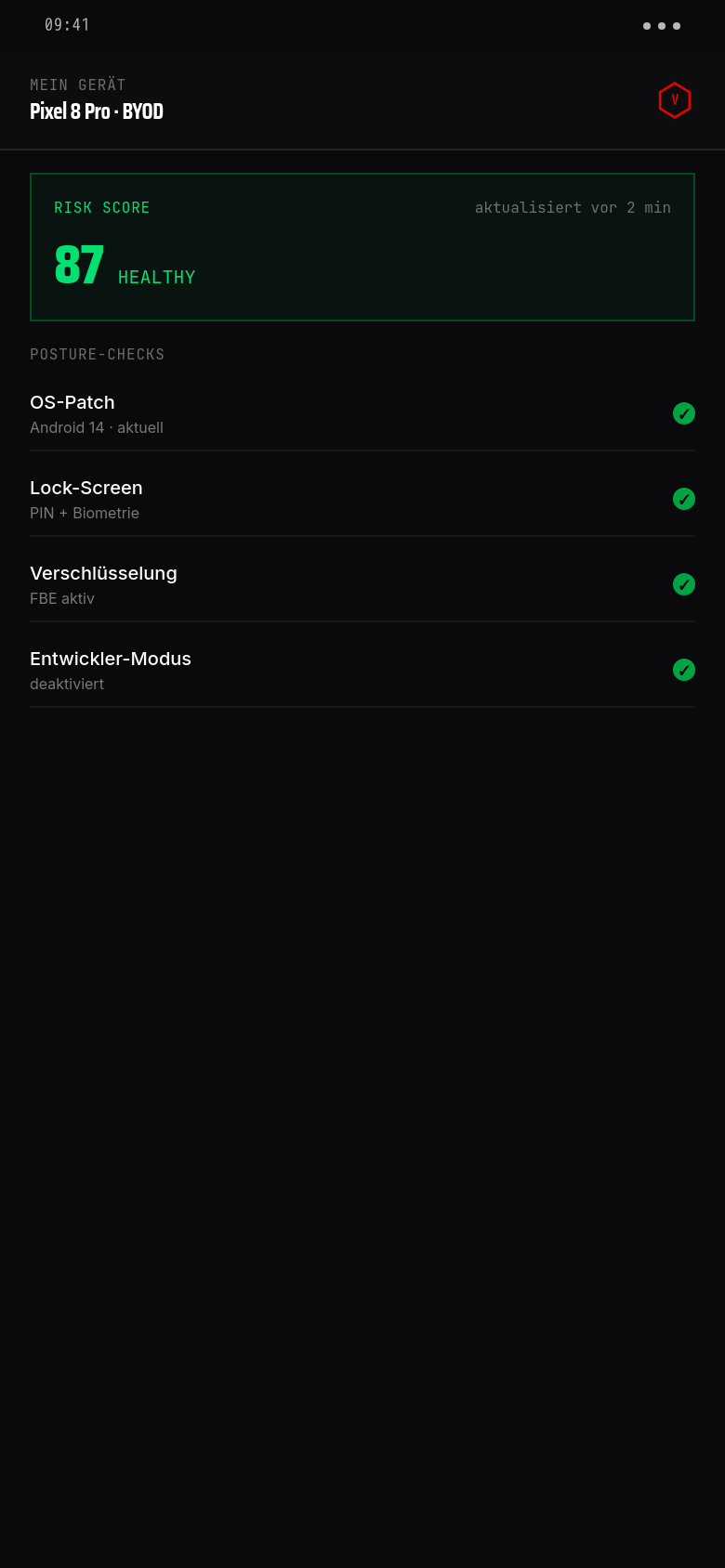
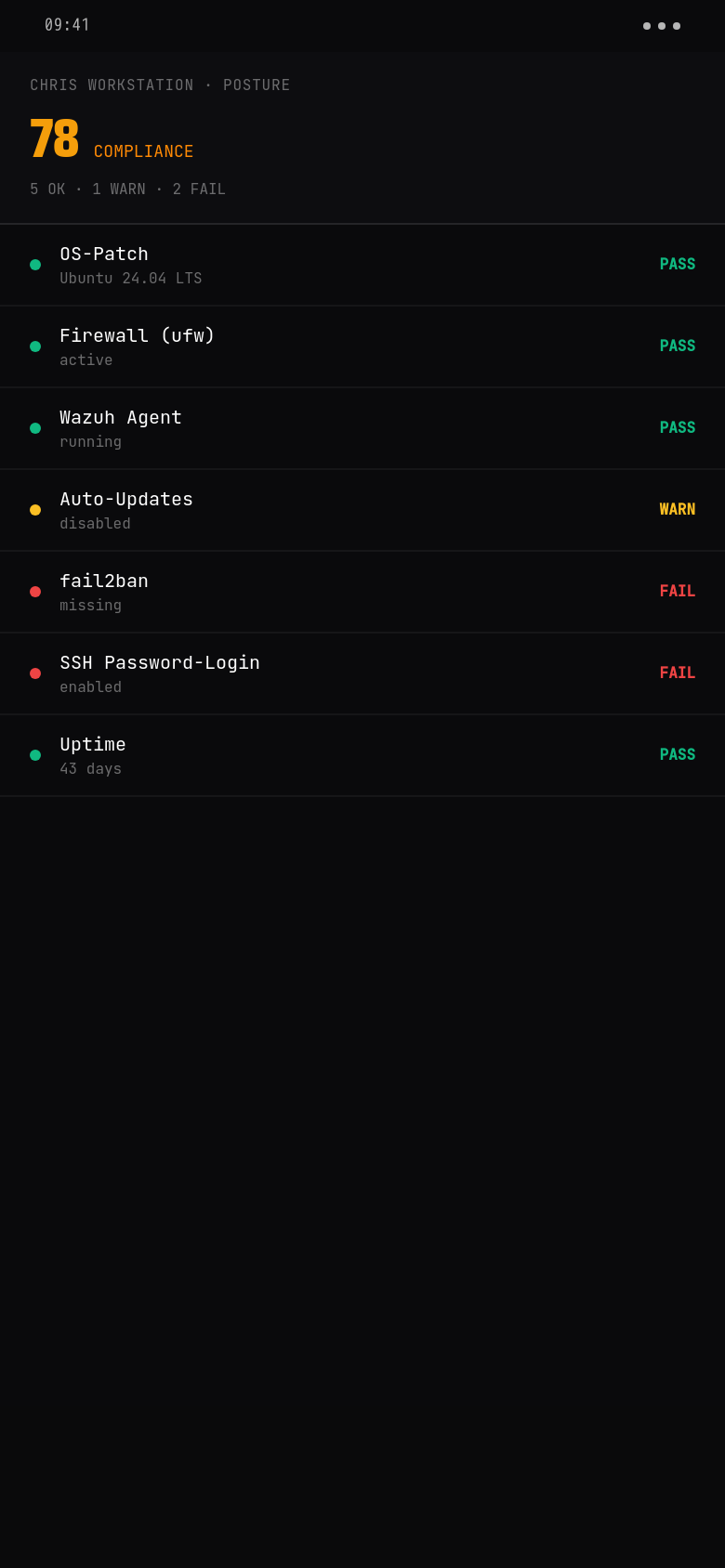
Posture im Drilldown
So sieht ein konkretes Gerät aus: Chris-Workstation, Compliance-Score 78, fail2ban fehlt, SSH-Password-Login ist offen — beides Findings, die direkt in Auto-Fix-Maßnahmen umschlagen.
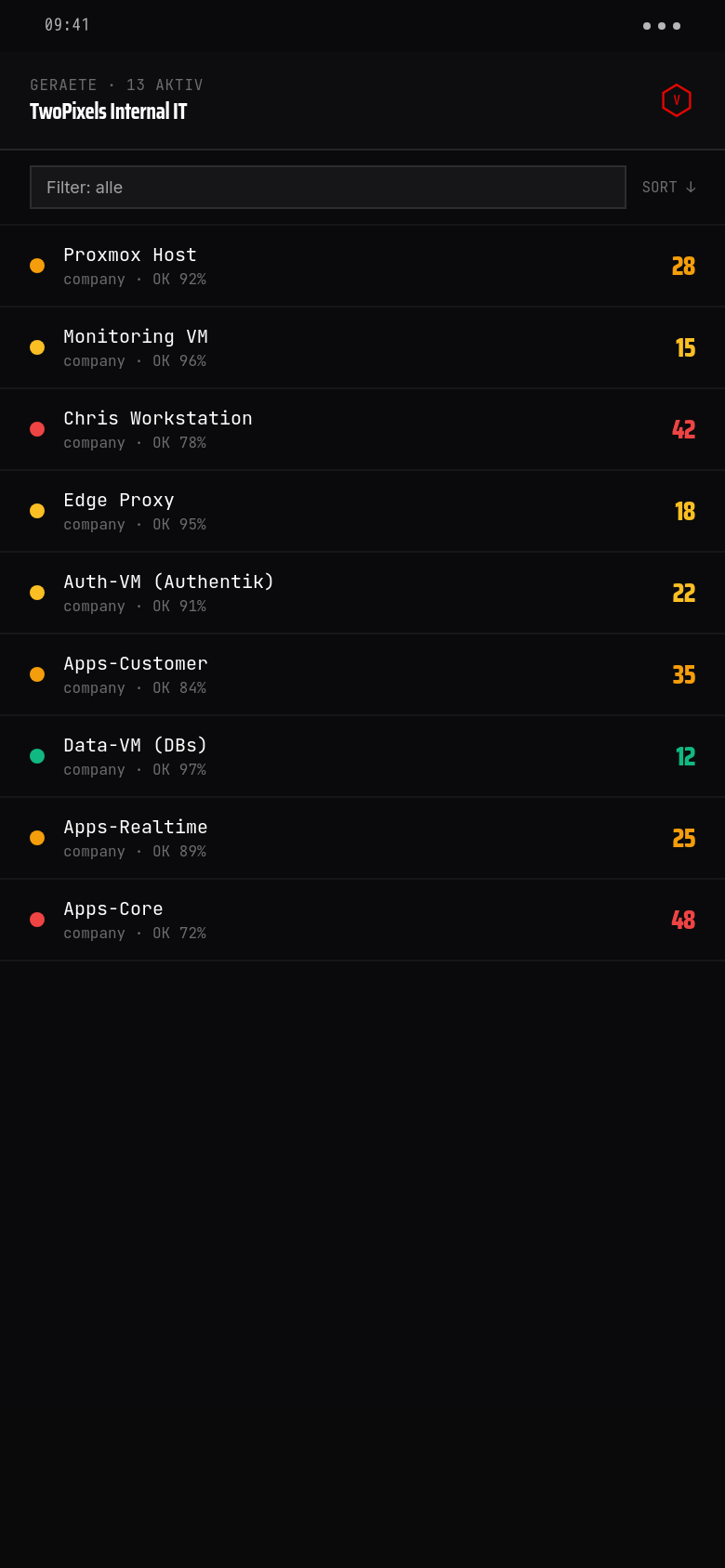
Farbcodierter Risk-Score pro Gerät. Grün ab 0–15, Gelb 15–25, Orange 25–40, Rot ab 40. Operatoren stellen die Schwellen je Mandant ein.
Filter + Sortierung. Nach Risiko, Compliance, letztem Heartbeat, Owner-Type (Company / BYOD). Listen-View skaliert auf Hunderte Geräte ohne Performance-Verlust.
Ein Tap zum Drilldown. Posture-Check pro Signal, Historie der letzten 30 Tage, direkt verlinkt mit dem Wazuh- Alert, der das Finding erzeugt hat.
Collected security signals
OS version
Outdated operating system versions contain known vulnerabilities. Vyrex checks the installed version against current CVE data.
Screen lock status
Is a screen lock (PIN, pattern, biometrics) active? A disabled screen lock is one of the most common mobile risks.
Device encryption
Is device storage encryption active? On modern Android and iOS devices it is active by default, but can be disabled.
Root / jailbreak
Vyrex checks for known indicators of root (Android) or jailbreak (iOS). The result is an indication, not a verdict.
Network connection
Which network type is the device connected to? Open Wi-Fi or known risky networks increase the risk score.
Last app activity
When did the companion app last report a check-in? Extended inactivity may indicate a lost device or disabled app.
Developer mode (Android)
Enabled developer mode opens USB debugging and further attack surfaces. Captured as a risk signal.
Biometrics usage
Does the device use biometrics as primary screen lock? Biometrics are considered stronger than PIN or pattern and are rated positively.
Mobile Risk Score
Every enrolled device receives a risk score from 0 (no detected risk) to 100 (critical risk). The score is updated at every check-in and displayed in the companion app and the portal.
Score basiert auf OS-Patch-Level, Lock-Screen, Biometrie, Posture-Checks und korrelierten Edge-Hinweisen. Schwellwerte sind Operator-konfigurierbar.
- 01OS version: highest weighting — known CVEs raise the score significantly
- 02Screen lock and encryption: basic hygiene, medium weighting
- 03Network connection: situational, rises on open Wi-Fi
- 04Inactivity: increases with time without check-in
- 05Root/jailbreak: critical factor, immediately raises the score to at least 70
Recommended actions
Trigger OS update
When an outdated OS version is detected, the device owner receives a push with a direct link to the update settings.
Enable screen lock
A missing screen lock triggers an alert with step-by-step instructions — explained separately for Android and iOS.
Switch network
When connected to a risky network, the app recommends switching to mobile data or a known safe Wi-Fi.
Re-enroll device
After a device change or factory reset, re-enrollment is required. The app guides through the process.
Notify IT
For critical findings (root, severe CVE, persistent inactivity), the device owner can notify the IT department with a single tap.
Häufige Fragen
Is the risk score visible to me as an employee?+
Yes. The score is viewable at any time in the companion app, including an explanation of which signals influence it.
What happens when my score becomes critical?+
You receive a push alert with an explanation and a recommended action. A finding is simultaneously created in the Vyrex portal for the IT administrator.
Can the score produce false positives?+
Yes, particularly for root detection. The signals are indicators, not definitive judgements. IT staff can manually close and comment on findings.
How often is the score updated?+
At every check-in of the companion app, at a minimum once daily. For critical signals (e.g. connection to a risky network) immediately.