
Manage incidents, even when you're on the move.
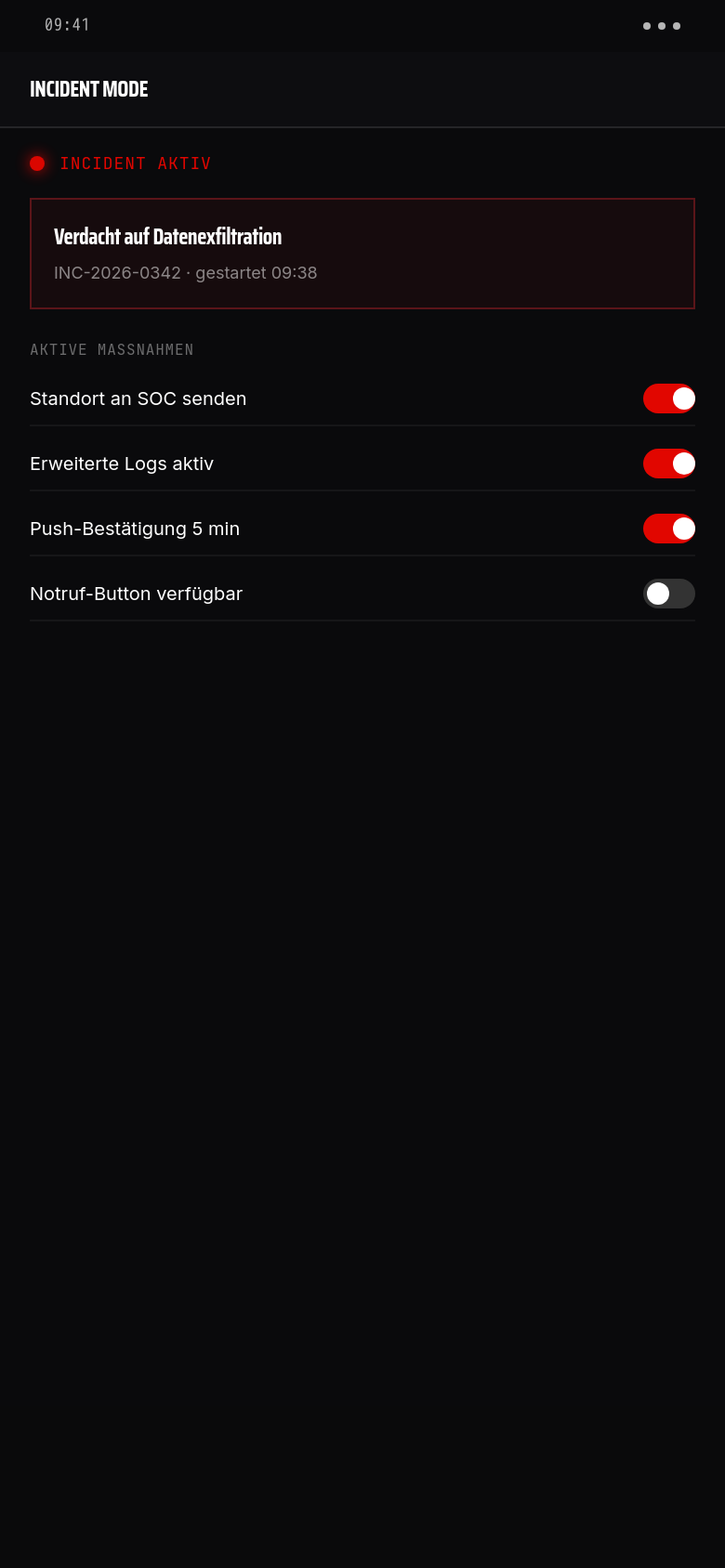
Security incidents do not respect office hours. The Incident Mode in Vyrex Mobile allows operators and device owners to actively participate in incident response — mobile, secure, documented.
Vier-Augen-Prinzip in einem Tap
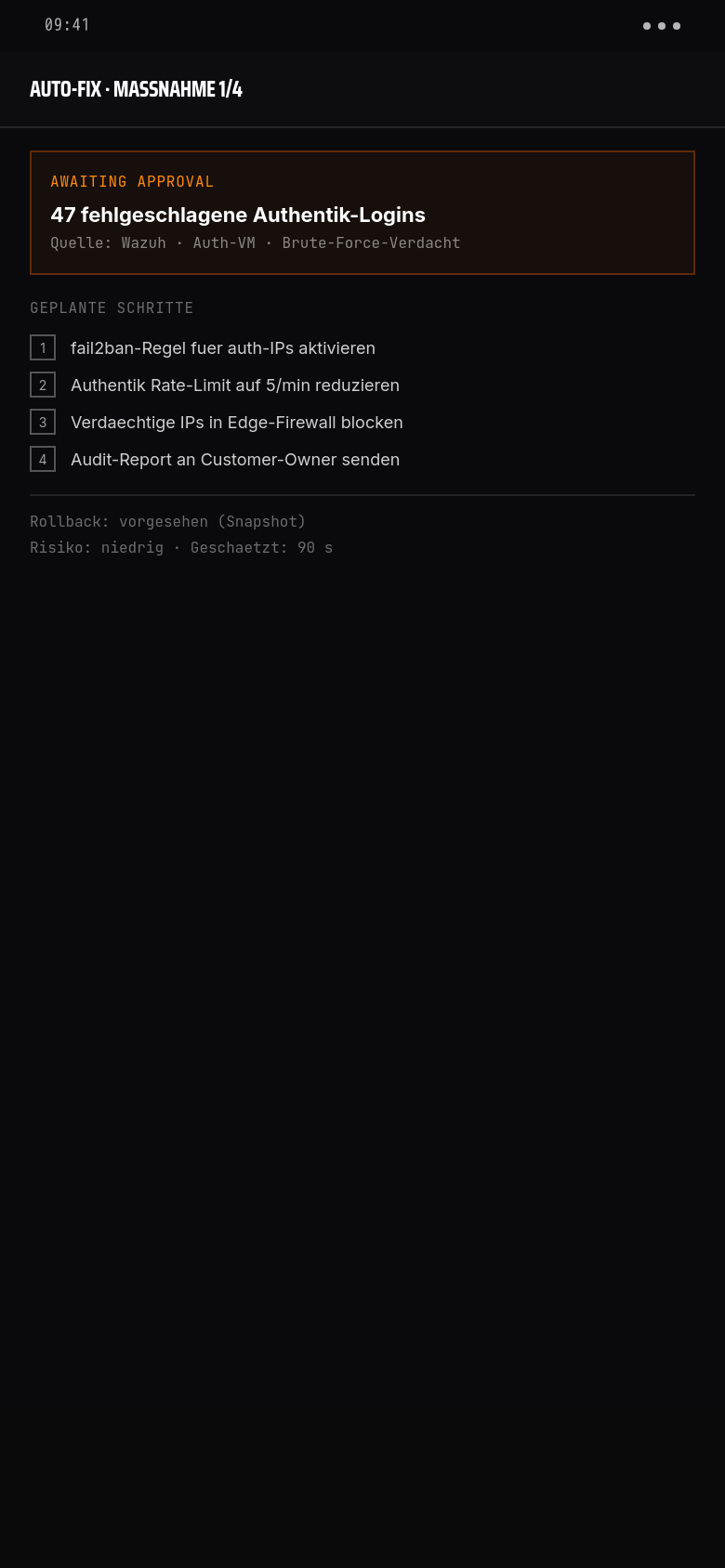
Jede Maßnahme zeigt: was Vyrex tun will, welche Schritte geplant sind, Rollback-Status, geschätzte Dauer. Customer-Owner genehmigt aus dem Bett — ohne SSH, ohne Laptop.
Vollständige Transparenz. Jede geplante Aktion ist nummeriert: fail2ban-Regel hinzufügen, Authentik Rate-Limit reduzieren, Edge-Firewall-Block, Audit-Report. Sie sehen vorher, was passieren wird.
Rollback-Plan inkludiert. Für jede Maßnahme prüft Vyrex vorab: ist Rollback möglich? Wird hier dokumentiert. Bei „nicht möglich" gehen Sie ins Vyrex-Portal für die detaillierte Risiko-Abschätzung.
Audit-Trail garantiert. Wer hat wann was freigegeben, mit welchem Begründungstext. Wird in audit_log der Vyrex-DB und in den Monthly-Security-Report aufgenommen.
How incident mode works
- 01
Incident active
An operator activates incident mode in the Vyrex portal for one or more incidents. Affected users are notified by push.
- 02
Device owner informed
The companion app displays an incident banner with a description and action options. No ambiguous notifications.
- 03
Share location (optional)
Device owners can voluntarily and time-limitedly share their location — e.g. to confirm they are not at the office premises.
- 04
Approve fix actions
The operator proposes an action (e.g. reset VPN credentials). The device owner confirms or declines — directly in the app.
- 05
Report status
Device owner reports back: device secured, access changed, device lost. All feedback flows into the incident record.
- 06
Incident closed
Operator closes incident mode. All actions, approvals and timestamps are recorded in the audit log.
What incident mode enables
Mobile fix approvals
Operators can propose actions that the device owner confirms directly in the app — without email delays.
Temporary location data
Voluntary, time-limited location sharing by the device owner. Duration and purpose are transparently documented.
Status messages
Device owners can send defined status messages (device secure / device lost / credentials changed).
Acknowledge escalations on mobile
Open escalations can be acknowledged directly in the companion app — outside the portal as well.
Lock device (opt-in)
With explicit consent, a device owner can put their own device into a restricted mode through the app.
Incident log
All actions, timestamps, approvals and status messages are automatically logged and viewable in the portal.
Privacy in incident mode
Incident mode never accesses additional data without the device owner's knowledge. All extended permissions (location, device lock opt-in) are voluntary and explicitly requested in the app.
- Location data only with active, time-limited release by the device owner
- No automatic activation of extended permissions by the employer
- All approvals and rejections are stored with timestamp in the audit log
- Revocation of a permission is possible at any time in the app
Integration with RustDesk
For devices active in incident mode, an optional RustDesk remote access session can be initiated — exclusively with explicit consent from the device owner and only for the duration of the active incident.
Häufige Fragen
Can my employer activate incident mode without my knowledge?+
Incident mode is activated and the device owner is notified by push. Extended permissions (location etc.) require active consent in the app — the employer cannot activate them unilaterally.
What happens to location data after the incident?+
Location data is automatically deleted after the incident is closed. The audit log retains the period of consent, not the actual coordinates.
Can I decline a proposed fix action?+
Yes. Every proposed action can be declined in the app. The refusal is logged with a timestamp; the operator can then escalate.
How long can incident mode stay active?+
There is no technical time limit. Best practice is to close incident mode after actions are completed. After 72 hours of activity the portal generates a reminder.